


- What are the pros and cons of different positioning methods?
- What is Sparse LBL (range-aiding) used for?
- What is a Sparse LBL (range-aiding) set up?
- Why is Sparse LBL array planning important and what are the key considerations?
- What are the pros and cons of different positioning methods?
- How sparse is a sparse LBL array?
- How do I calibrate my sparse LBL array?
- How to plan my sparse LBL array (guidance note)
Below you will find the recommended steps to follow to shut down a Marksman/Ranger 2 GyroUSBL or DPINS system
- Navigate to MM/Ranger 2 main menu > system setup > transceiver
- Select the control tab
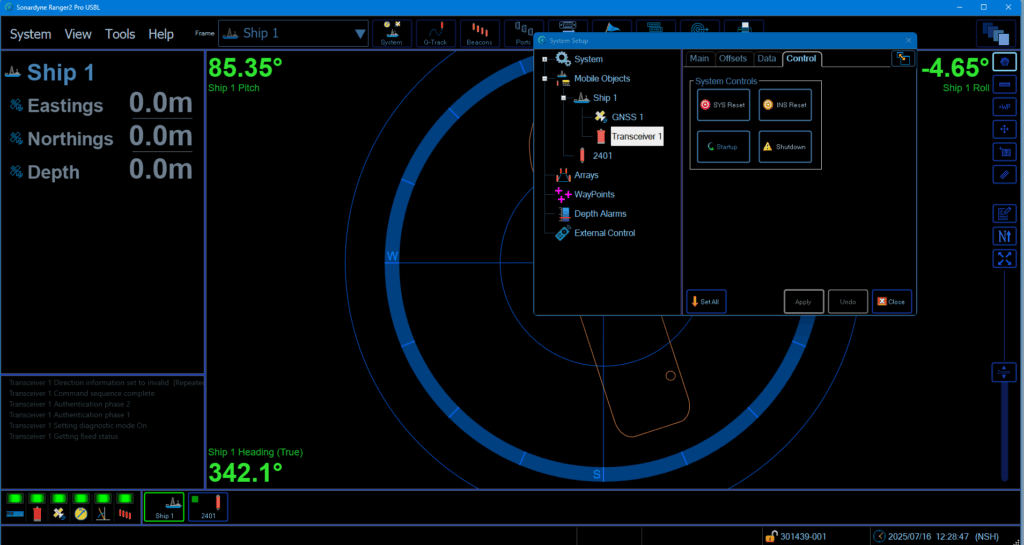
3. Select shutdown and Yes to shut down the Lodestar

4. When the shutdown is complete the operation box will report the following and the Attitude/Heading will turn either orange (if you have external sensors interfaced) or red (if no other external sensor interfaced). The shut down procedure is also listed in the bottom left hand operation screen (LS Shutting down).
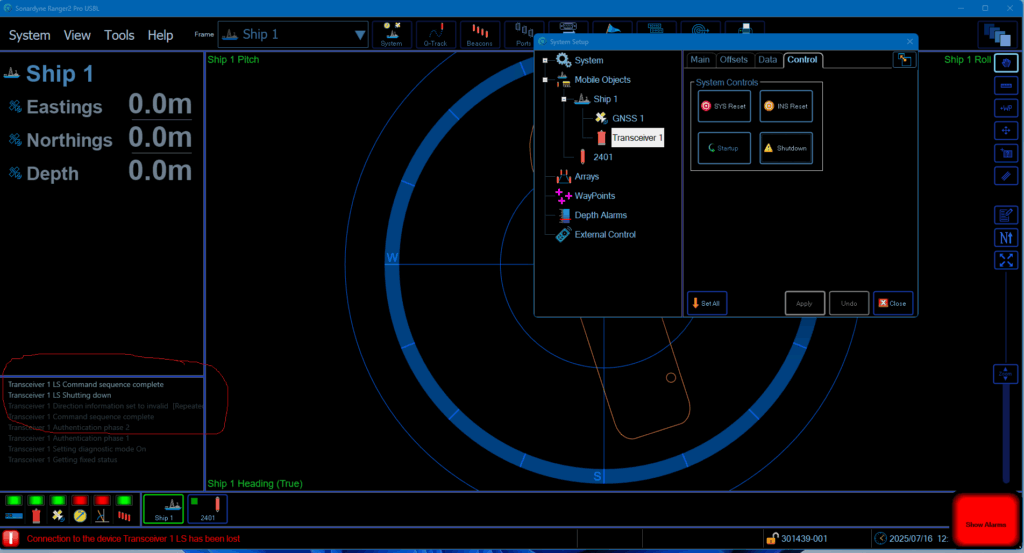
5. You can now exit Marksman/Ranger 2
The latest firmware version is V1.0.2.8
The release notes can be viewed below:
For more information and to download firmware, please contact Sonardyne Support.
The latest firmware version is V1.0.2.8
The release notes can be viewed below:
For more information and to download firmware, please contact Sonardyne Support.
The latest SPRINT-Nav Mini firmware version is V1.3.641
The release notes can be viewed below:
For more information and to download firmware, please contact Sonardyne Support.
The latest firmware version is V1.00
The release notes can be viewed below:
For more information and to download firmware, please contact Sonardyne Support.
This article describes how to mount and extract an ISO image to the PC using Windows® 10.
Sonardyne supplies ISO images for our navigation, subsea equipment and test software for customers.
Note: Windows 10 allows you to mount an ISO image without requiring any other software.
Procedure
1. Open File Explorer and navigate to the ISO image file.
2. Right-click on the file and select Mount.

3. The image will be mounted to a drive and displayed in the File Explorer drives and folders tree.

4. Open the drive to view the extracted files.

Contact [email protected] for more information.
The latest Lodestar firmware version is V3.07.00.2139
The release notes can be viewed below:
For more information and to download firmware, please contact Sonardyne Support.
The latest Marksman software version is V6.04.06
The release notes for Marksman software can be viewed below:
V6.04.06 (tested on Windows® 10 and 11 OS, only supports Sonardyne 6G equipment, does not support Windows® 7)
V6.04.05 (tested on Windows® 10 and 11 OS, only supports Sonardyne 6G equipment, does not support Windows® 7)
V6.04.04 (tested on Windows® 10 OS, only supports Sonardyne 6G equipment, does not support Windows® 7)
V6.02.04 (tested on Windows® 7 OS, only supports Sonardyne 6G equipment, does not support Windows® XP)
V4.06.03 (tested on Windows® 7 OS, supports Sonardyne 5G and 6G equipment, does not support Windows® XP)
For more information, please contact Sonardyne Support.
The latest Micro-Ranger 2 software version is V6.04.07
The release notes for Micro-Ranger 2 software can be viewed below:
V6.04.07 (tested on Windows® 10 and 11 OS, only supports Sonardyne 6G equipment, does not support Windows® 7)
V6.04.06 (tested on Windows® 10 and 11 OS, only supports Sonardyne 6G equipment, does not support Windows® 7)
V6.04.05 (tested on Windows® 10 and 11 OS, only supports Sonardyne 6G equipment, does not support Windows® 7)
V6.04.04 (tested on Windows® 10 OS, only supports Sonardyne 6G equipment, does not support Windows® 7)
V6.02.04 (tested on Windows® 7 OS, only supports Sonardyne 6G equipment, does not support Windows® XP)
For more information, please contact Sonardyne Support.